GIVEAWAY! We’re asking for your feedback on topics for Cyber Treats and giving away a big popcorn tin from Young’s Popcorn Heaven. Click the link at the bottom to enter!
Personal Cloud Storage: the Cost of Convenience
How many employees use unsanctioned cloud servers? According to a report by Statista, at least 35% of employees use unapproved file storage solutions like Dropbox.
The Risks: What’s at risk? Using Dropbox, personal Google Drive accounts, and other personal cloud storage can lead to data breaches or unauthorized access to sensitive information. Some things to consider:
Your Data, Where? Businesses have limited control over data stored in public cloud services. This means data is often synced across personal devices without oversight or even inadvertently shared with unauthorized parties.
Compliance Woes Public cloud services may not comply with industry-specific regulations and standards, which can lead to legal troubles for your company.
Offboarding Concerns When employees use personal cloud storage, important documents and files can be lost forever if they leave.
The Solution: A solution like Microsoft OneDrive gives your team all the capabilities they want for file sharing and cloud storage, with essential enhanced security features. Education is key to convincing your team to ditch the personal cloud storage and get onboard with OneDrive’s convenience and flexibility.
Accessibility and Seamless Integration: Whether at home, the office, or on the go, you can retrieve documents using any device (computer, smartphone, or tablet).
Security: Cloud storage provides secure backup, reducing the risk of data loss due to hardware failure or theft. Business solutions like OneDrive offer advanced management features, such as detailed access controls and audit logs, to help avoid rolling out the welcome mat for snoops and hackers.
Collaboration: Employees can collaborate on shared documents in real time in Microsoft Word, Excel, PowerPoint and more.
Educating your team on the advantages of using the right cloud storage is an essential part of your business continuity and data safety playbook.
As always, if you have any questions, simply reply to this email or give us a call at (309) 689-3900. We have more resources on OneDrive and other file storage and sharing options available to you.
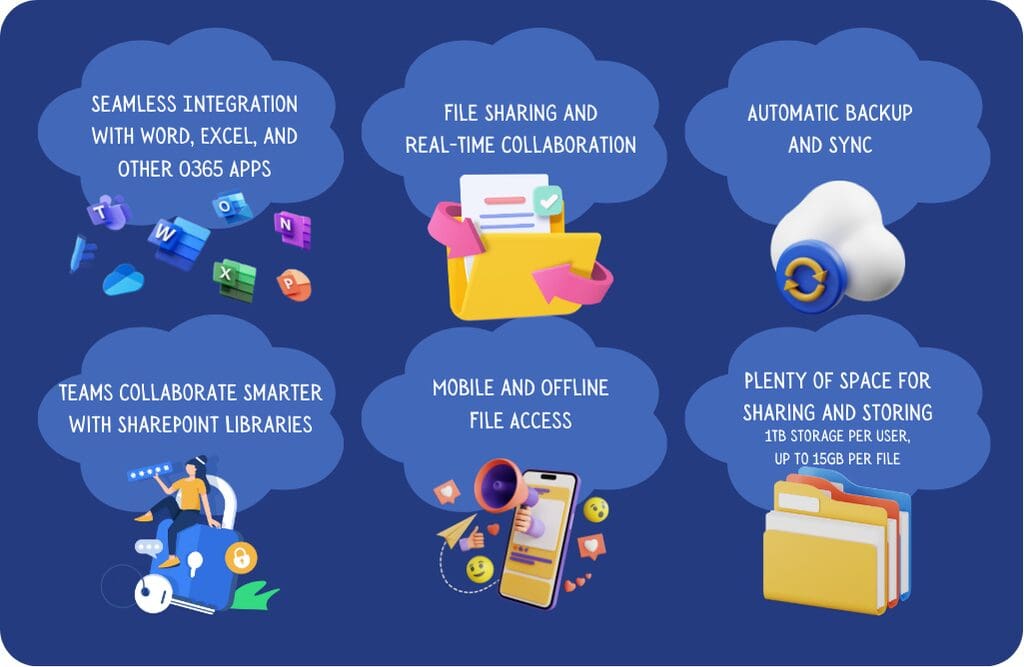
Already have OneDrive? Check out these features!
There’s still time to enter the Cyber Treats Popcorn Giveaway!
Want extra entries? Each person you refer to Cyber Treats earns you one additional entry to the popcorn drawing. Forward them this email and have them fill out the Popcorn Drawing form to enter and subscribe to the newsletter.
Contest ends 9/30/2024. See site for terms and conditions.
Looking for a custom solution? Schedule a discovery call with Trey to see what your options are for sharing and storage within your organization.
GIVEAWAY! We’re asking for your feedback on topics for Cyber Treats and giving away a big popcorn tin from Young’s Popcorn Heaven. Click the link at the bottom to enter!
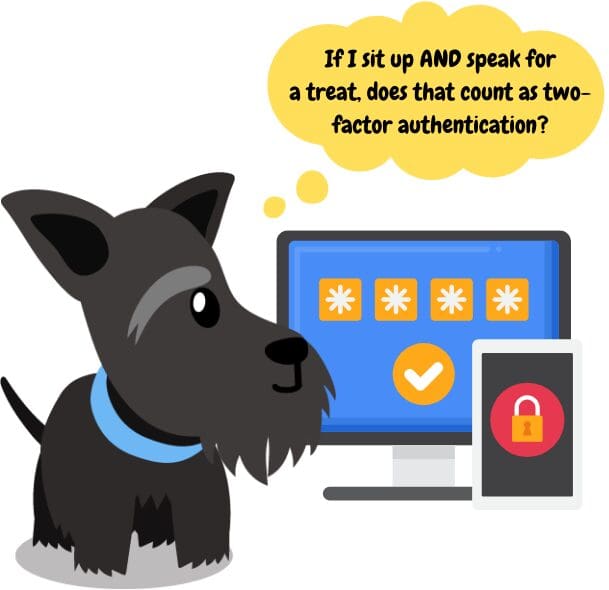
We’re all familiar with that pesky little pop-up that appears on log-in screens across the web: “Do you want to enable two-factor authentication on this account?”
Your answer should always be YES!
Even if someone gets your passwords, MFA can keep them from stealing your bank information or other online presence.
MFA (sometimes this is called two-factor authentication, one-time passcode, or a login token) usually involves entering a code sent to your email or phone. Sometimes, online accounts will also take your IP address and location into consideration when it’s time to log in (another “factor”).
Do you have any of the following? If so, check now to see if you have MFA or 2FA activated. Top Sites/Apps to Enable MFA – Email Accounts – Business and Personal (this controls access to almost ALL your other accounts) – Facebook, Instagram, LinkedIn, or other social media – Online Banking and Credit Card Websites – Insurance Portals – Dropbox or Other Digital Storage Services – Online Tax Preparation Websites
MFA settings are often found in your account information or security settings when you log in and may be labeled “additional security.” If you have any questions, just reply to this email and ask for help.
? TRADE OFFER! ? We receive: your feedback about the future of Cyber Treats. You receive: a chance to win a popcorn tin from Popcorn Heaven!
Want extra entries? Each person you refer to Cyber Treats earns you one additional entry to the popcorn drawing. Forward them this email and have them fill out the Popcorn Drawing form to enter and subscribe to the newsletter.
Contest ends 9/30/2024. See site for terms and conditions.
Want some advice on MFA for business cybersecurity? Our team is here to help with MFA solutions for your Microsoft Exchange, VPNs and more to keep your business’ data safe. Call us at (309) 689-3900 or schedule a discovery call with Trey to see what your options are for managed services and MFA.
Smart business owners aren’t only investing in cybersecurity products and software packages to keep their data safe: they’re keeping tabs on their teams’ cybersecurity awareness. It’s even smarter to think of this practice as part of your security stack.
If you’re like most people, when you think of an “audit,” you think of penetration tests, or pen testing, a process that involves a full inventory of your security stack and practices. This can be limited to just your network or include attempts to physically infiltrate your business for the purposes of finding weak points.
Pen tests are an ideal choice for a full picture of your company’s cybersecurity, but what about in-between? If you want a good idea of where your team stands on security practices, here are some ways to assess your strengths and educate your team on areas for improvement.
Phishing Simulations
Phishing simulations are a great way to test your employees’ cyber awareness. Maybe you’ve implemented these either on your own or with the help of an IT provider.
Often thought of as “gotcha” training devices, these are actually proven to be highly effective in preventing breaches due to human error. It often only takes one alert for an employee to improve practices, read emails more closely, and avoid clicking on suspicious links.
Some phishing simulations include training materials or videos for your team to watch if they “fail” the test. These videos reinforce important concepts for your team to become more cyber safe, and incentivize employees to watch for phishing emails and complete training.
Training Opportunities
Want to do more cybersecurity training with your team, but don’t know where to start? We can help. We have training resources and more that you can use in your company, such as presentations, articles, video links and other resources.
Do you have daily or weekly meetings with your team? These regular meetings are the perfect opportunity to discuss cyber awareness. We even have quizzes available to gamify your cyber awareness meetings and make it more fun and engaging.
Forward Those Tech Tips!
We offer a weekly tech tip email (sign up here!) with insights and quick tips (and a little comic relief). Many of our clients forward the email to their whole team for a quick refresher on security practices.
Have any questions about employee training or other managed services or cybersecurity concerns? Contact Facet. Our team of helpful, knowledgeable technicians and support staff are happy to answer questions and find a solution that’s the perfect fit for your business. We believe it’s our job to provide you with the tools you need so you can focus on growing your business, not chasing IT issues. Want to learn more? Let’s talk! Contact us here.
We’ll be sharing valuable tech tips, cybersecurity practices, and current information that you can share with your team (featuring Maggie and Boomer, cartoon versions of Facet’s “shop dogs.”)
Now, onto the tips!
It pays to stay vigilant.
3.4 billion phishing emails are sent every day–a staggering amount bolstered by bots and entire economies of scammers finding new ways to get around your email security.
At Facet, we’re big proponents of security awareness training, especially phishing simulations, which are proven to reduce breaches and security incidents, but there’s a hard truth:
Security awareness is only as effective as your vigilance on your busiest day, when you’re at your most distracted.
Our advice: make a habit of scrutinizing any email that has the following elements, every single time:
1. Suspicious sender’s email address (slight misspellings, strange domains, etc.) ? Real-life example: Paypal scam emails will often come from an address like “help.epaypal@outlook.com” or similar, instead of an “@paypal.com” email address.
2. Urgent calls to action or scare tactics demanding immediate response (this one is especially important in campaigns designed to impersonate high-level executives) ? Real-life example: a fake USPS email or text claiming you have a package stuck in customs that requires payment to process.
3. Requests for sensitive information like passwords, credit card numbers, etc. ? Real-life example: a fake CapitolOne fraud detection email that, once the link is clicked, directs you to a website where it will request your card information to lock your account.
4. Misspellings, poor grammar, or unusual formatting ? Real-life example: A fake bank email: “We have faced some problems with your Account please update the account .if you do not update will be Closed.”
5. Unsolicited attachments ? Real-life example: Scammers will include attachments that may have malware in them, including fake invoices or tax information.
Keep these strategies in your pocket to avoid costly breaches.
Need help with cybersecurity? Our team of experts can help you craft the ideal solution for your company. Give us a call at (309) 689-3900, or schedule a 15-minute discovery call with Trey to find out about email security solutions and more.
The statistics on cyberattacks are staggering. Around 3.4 billion phishing emails are sent daily. Over 4 million websites are infected with malware.
These attacks target businesses of all sizes in all industries. Mitigating your network security vulnerabilities can help you avoid becoming a statistic.
You need to identify the risks in order to address them. Keep reading to learn how to reduce common risks and why a network security assessment may be a good first step.
Ensure Proper System Configuration
System misconfigurations are a common vulnerability in network security. All devices, servers, and networks need the right security protocols.
Mistakes in the configuration process can happen as simple errors. Problems can also result from issues like weak passwords or access controls.
Configuration audits can help you identify weaknesses in your system configuration. Strong security protocols for your organization and ongoing monitoring contribute to keeping your system secure.
Secure Your APIs
An API (Application Programming Interface) lets two software components communicate with each other. The API structures requests and responses between the two applications.
One application is the client and the other is the server. The client sends a request to the server as data. The server sends output data back to the client.
APIs are structured to minimize exposure between the two applications. Vulnerabilities are still possible, though. Common risk factors are:
Broken access control
Overly broad data exposure
Authentication issues
Regular testing can show potential security risks in your APIs. Good password management and strong security measures will help prevent API vulnerabilities.
Follow the Principle of Least Privilege
Following the principle of least privilege helps ensure that only authorized users have access to your system. This principle means that users get the minimum level of access needed to do their jobs.
Least privilege extends beyond human users. It applies to APIs, systems, and connected devices that need permissions to perform tasks.
Least privilege reduces network security vulnerabilities in several ways. It reduces the attack surface for bad actors.
It helps stop malware from spreading. The risk of malware increasing its access is lower. The malware can’t move laterally as easily.
Patch and Update Software
Software vendors regularly find security flaws in their products. They release new versions to fix these vulnerabilities. Failing to install these critical updates promptly puts your business network at risk.
Bad actors know about the flaws in software programs. They exploit them to steal data or infect the system.
Unpatched vulnerabilities are a major factor in successful cyberattacks. They’re also one of the easiest to address. A proactive update schedule helps ensure your software and devices are up-to-date.
You can use a patch and assets management tool to facilitate this process.
Implement Robust Password Management
Using poor passwords and reusing passwords for multiple logins creates a security risk. Most people make easy-to-remember passwords based on their personal information. This makes guessing the password easier for hackers.
If a hacker guesses a shared password, they can use it for all the associated accounts.
Good password management mitigates these risks. A password manager can help users benefit from strong passwords without having to remember all of them individually. Your organization can implement password standards for length and complexity.
Limiting login attempts is another way to help prevent password theft.
Use Multi-Factor Authentication
Multi-factor authentication reduces the risk of unauthorized access to your network. Single-factor authentication uses a single method to authenticate users. The most common method is a password.
Bad actors can easily bypass single-factor authentication.
Multi-factor authentication requires more than one type of authentication. The three types of factors are:
Something a user knows (knowledge)
Something a user has (possession)
Something a user is (biological)
A password or PIN are common examples of the first category. The possession factor could include a security token or software token from a smartphone. Biometric verification methods include facial recognition, fingerprint scans, and retina or iris scans.
Even if a would-be hacker steals or discovers a password, they can’t access your system without another form of verification. Your IT personnel or IT services provider can implement multi-factor authentication for your business network.
Conduct a Cybersecurity Assessment
A network security assessment identifies vulnerabilities in your system. You can target your resources more effectively to improve your cybersecurity processes.
The two main types of network security assessment are:
Penetration testing
Vulnerability assessment
Penetration testing tries to attack your system to find any weaknesses. A vulnerability assessment is often automated using tools like a network scanner. It identifies and prioritizes vulnerabilities.
Cybersecurity audits are an essential tool. They discover security risks before a bad actor does. They help you prioritize which problems to address first.
You can measure the impact an attack would have.
An assessment also helps you evaluate your current security measures. You can see whether they’re effective.
An internal person or team can conduct your network security assessment. You can also use a third-party service. Using a third party has several advantages.
Security risk assessments can be complex and time-consuming. Giving this responsibility to a reputable third-party firm lets your IT personnel focus on their regular tasks. The assessment firm will ensure that the testing meets applicable compliance, regulatory, and industry standards.
Implement Security Awareness Training
Human error is a factor in many cyberattacks. Your personnel are an important line of defense in your cybersecurity strategy. Security awareness training covers threats such as:
Phishing
Social engineering
Compromised passwords
Training should include an educational component as well as exercises to test awareness and reactions. This gives your employees the opportunity to learn and reinforce best practices.
Choose the Right IT Services Partner
Addressing your network security vulnerabilities is essential for the health of your organization. A network cybersecurity assessment will show any weaknesses. The right IT services partner can help you develop a plan to mitigate the risks.
Facet Technologies is dedicated to serving the unique cybersecurity needs of your business. We offer contract and as-needed support, consulting, and implementation. We’ve been serving clients in Central Illinois since 1989.
Our Security Plus Audit evaluates more than 100 aspects of your network infrastructure. We’ll give you a roadmap with prioritized action items.
Schedule a cybersecurity assessment from Facet today and take the first step toward a more secure business.
The internet has the power to connect us with the world around us, whether it’s across the globe or just across the street. With more and more people turning to the internet to find information, work, and shop, the potential for data breaches also grows.
Data from IBM shows that the average cost of a data breach in 2023 amounted to $4.45 million, representing a 15% increase from 2020. There are several different types of data breaches you need to be aware of. Knowing what to look for or expect can help you better protect yourself from a potential data breach.
With that in mind, let’s take a look at 6 of the most common types of data breaches below.
1. Phishing Attacks
Phishing attacks typically involve deceptive attempts, often through emails or messages. They may use a false identity or a fake link to trick individuals into entering sensitive information such as passwords, credit card numbers, or personal details. Once this information is obtained, it can result in identity theft, financial fraud, and even the exposure of private business data.
In business settings especially, it is essential to provide comprehensive training on recognizing phishing attempts. For example, it is possible to hover over links without clicking to preview the destination URL. You can also utilize email filtering services to keep phishing attempts at bay.
Train employees not to enter sensitive information unless they’re sure of the request’s authenticity. Teaching employees the importance of verifying email senders and avoiding clicking on suspicious links or downloading attachments can prevent these types of data breaches from the get-go.
2. Malware Infections
Malware, short for malicious software, refers to any software specifically designed to harm or exploit computer systems, users, and networks. Once the malware infection takes hold, it can carry out a range of malicious activities, such as stealing sensitive information, disrupting operations, or providing unauthorized access to attackers.
A malware infection can result from several different causes, such as:
Malware coded advertisements
Software vulnerabilities
Infected external devices
Compromised email attachments and links
Malicious websites
Malware infections are one of the most common types of data breaches behind phishing attacks. To stay on top of malware infections, install and regularly update antivirus and anti-malware software on all your devices. This can help prevent a malware infection due to accidental downloads or unsafe browsing habits.
3. Ransomware Attacks
Ransomware, as the name implies, involves encrypting a user’s files or entire system. The ransomer then demands a payment in exchange for the decryption key. 2023 saw a 37% increase in ransomware attacks with an average ransom payment far exceeding $100,000.
Ransomware can effectively cripple a business by making crucial files inaccessible. Government, healthcare, financial, and technology industries are the most likely to get hit by these types of security breaches.
If your company is hit by ransomware, it can be a costly endeavor to get your business data back. There’s also no guarantee that once the money is paid, the ransomer will actually make good on their promise.
To protect your company from ransomware attacks, regularly back up critical business data to offline or secure cloud storage. In the event of a ransomware attack, you will be able to restore your information without resorting to paying the ransom.
You should also install robust cybersecurity software solutions that include anti-ransomware features. Keep all of your cybersecurity software, including security tools, up to date to stay on top of ransomware attacks.
4. Physical Security Breaches
Physical security breaches involve unauthorized access to an office or building space. This can result in damage and compromised physical assets, facilities, or information.
These types of data breaches occur when individuals or entities like former employees gain improper entry to restricted areas. They may steal physical devices containing sensitive information or engage in activities that compromise the security of physical spaces.
Examples of physical security breaches can include the theft of laptops and unauthorized access to secure rooms. It may also involve vandalism that can affect the integrity of physical security measures.
Always make certain to safeguard any physical devices containing sensitive data. Use encryption and implement security measures like biometric access to prevent unauthorized physical access.
5. DDoS Attacks
DDoS stands for Distributed Denial of Service. The primary purpose of DDoS attacks is to overwhelm a website or an online service with too much fake internet traffic.
DDoS attacks use a large number of computers working together to flood a website or service, causing disruption. This serves to slow it down or render it completely unavailable to regular site visitors.
To combat DDoS attacks, invest in and employ DDoS mitigation tools. This will help you maintain a resilient network infrastructure. Monitor your traffic patterns for any unusual activity.
Design your network infrastructure with redundancy to minimize the impact of potential DDoS attacks.
6. Human Error
Believe it or not, one of the most common types of data breaches occurs because of human error. According to a Stanford University study titled The Psychology of Human Error, as much as 88% of data breaches are the result of human error.
A simple mistake like falling for a fake link in a phishing email can seem innocent, but it can have drastic repercussions. In a matter of seconds, a malware infection can overtake a company’s computer systems and expose precious business data to hackers.
Prevention and education are key to staying safe from human error from a compromised email. Conducting regular training programs focusing on data protection, privacy policies, and security best practices is vital. You must also emphasize the importance of careful handling of sensitive information.
Establish and enforce clear data handling procedures to minimize errors and encourage employees to double-check recipients when sending sensitive information.
Protect Your Business from Common Types of Data Breaches with Facet Technologies
With so many different types of data breaches lurking around every corner, it’s more important than ever to protect your business from a costly and damaging security breach. Having the right IT service and tech support on your side is imperative.
Facet Technologies has been your source for Business IT Support and Managed Services in the Central Illinois area since 1989. We take the time to understand your business needs. You can trust the experts at Facet Technology to meet your unique priorities.
Ready to give your IT a much-needed boost? Contact us to discuss your IT service needs today.
‘Tis the season for resolutions! Business owners: is your current cybersecurity plan cutting it in the new year?
If you’ve grown in 2023, it’s time to consider what you need to do to ensure your hard work is protected. We’ve compiled a list of the most important steps you can take in 2024 to better protect your business from current cyber threats. Read on to see what they are!
Understand the Threat Landscape
The first step towards effective cybersecurity is understanding the threat landscape. Cyber threats are evolving at an unprecedented rate, with new vulnerabilities and attack vectors emerging every day. In 2023, we saw a significant increase in ransomware attacks, data breaches, and phishing scams. As a managed service provider, it’s our responsibility to stay ahead of these threats and ensure our clients’ digital assets are secure.
Invest in Advanced Security Solutions
To combat these threats, investing in advanced security solutions is a must. This includes next-generation firewalls, AI-assisted endpoint protection, 24/7 monitoring, and a cloud services provider you can trust to keep you on the cutting edge of new security solutions. These solutions detect and mitigate cyber threats before they damage your systems and affect your bottom line.
Keep Up to Date with Regular Patching and Updates
One of the most effective ways to protect against cyber threats is by regularly updating software on your computers and mobile devices. Outdated software often has vulnerabilities that cybercriminals can exploit, and updates install patches that can prevent disaster. Make it a resolution to ensure all software, including operating systems, applications, and firmware, are up-to-date. If you have a managed service provider, they should be doing this for you. Be sure to ask if they are providing this service, as many MSPs wait until a problem arises to address badly-needed updates.
Implement Employee Training and Awareness
Human error is the leading cause of cybersecurity incidents for businesses. Investing in employee training and awareness has been proven to reduce incidents and it doesn’t have to be difficult. Employees should be trained to identify and respond to potential cyber threats, such as phishing emails and suspicious links. We offer phishing training and online courses as a part of all our managed services agreements.
Create an Incident Response Plan
Despite our best efforts, cyber incidents can still occur, and if they do, you need backups and disaster recovery plans (BDR). Your incident response plan should outline the steps to take in the event of a cyber incident, including identifying the incident, containing the threat, eradicating the threat, and recovering from the incident. Your MSP can help you devise your plan, which is also valuable if you are seeking cyber liability insurance or wish to have your policy renewed.
Look Ahead
At Facet, one of our core values is “Growth Through Adaptation and Innovation.” For us, this means that, as a company, we are constantly looking to stay ahead of cybersecurity threat trends to keep our customers safer. For your business, this may mean adapting to your current needs as a growth-focused company with a technology solution that matches your goals.
We’re here to help with your cybersecurity resolutions with technology plans and cybersecurity roadmaps that will keep you on the right path. We specialize in growth-oriented companies with 20 or more seats. If this is you, we would love to work with you and provide great managed services, helpdesk, and cybersecurity. Give us a call today or fill out our contact form to learn more.
In the digital age, information is a valuable business resource. As its value increases, so does the importance of data laws. This has led to the rise of compliance analysis.
Without proper compliance analysis, your company could face heavy fines. For example, if you’re operating in Europe and you break the GDPR, you could face a fine of up to 20 million Euros.
An IT compliance analyst ensures data integrity and legal adherence to ensure you follow the law. Ignoring these laws could hurt your organization.
So, how do you find the right person for this crucial role? What attributes should they have? This article covers everything you need to know.
Roles & Responsibilities in Ensuring Business IT Integrity
Before hiring, know what an IT compliance analyst does. Their main job is to ensure IT activities in your company follow internal policies and government regulations.
They may conduct regular audits, spot potential irregularities, and investigate them. They also identify vulnerabilities, like poor security practices that attract cyber criminals. For example, they may be responsible for dealing with ransomware.
Plus, they stay updated on the ever-changing landscape of IT law, and they are well-versed in the latest IT compliance solutions.
Qualification Criteria and IT Regulations
Qualification criteria can vary based on your company’s attributes. For instance, specific industries may need analysts with certain qualifications to stay compliant with IT regulations.
Different localities might also require a specialized analyst who understands local laws. For example, if operating in the European Union, you’ll need someone familiar with GDPR.
Check their educational background too. Look for degrees in computer science, cyber security, or a related field. Qualified pros often have certifications like CISA or CRISC.
Before posting a job, research the required certifications that are vital to your business. This will help you tailor the job posting and attract the right analysts for your company.
Experience Matters in Business Technology
Qualifications and certifications are crucial, but they can’t replace experience. Compliance analysis is a field with zero room for error. If your company isn’t compliant with regulations, massive fines could follow.
So, look for analysts with a proven track record in risk management and incorporating business technology into IT compliance. Don’t just search for someone with the most years in the industry. Find an analyst who’s skilled at navigating information compliance complexities.
For instance, seek analysts familiar with key compliance frameworks like ISR 27001 or HIPAA. If you’re not sure what kind of frameworks the candidate needs to have experience in, you’ll need to talk things over with your IT department.
Soft Skills and Cultural Fit
Soft skills and cultural fit also matter. Besides technical qualifications, find a compliance analyst with the right soft skills and company culture fit. IT compliance is complex, so seek an analyst who knows how to simplify it for a non-expert audience.
This helps them communicate effectively across your organization. Great technical skills won’t matter if you can’t understand them in meetings. No one wants to sit in a meeting while someone from the IT department talks in incomprehensible technical jargon.
Grasping Compliance Tools and Tech
IT compliance goes hand-in-hand with tech tools. So, top candidates should know the latest tools in the industry. They might be familiar with governance, risk management, and compliance platforms.
They need a sharp understanding of using technology to make compliance more efficient and improve data analysis. Plus, they should use tech to maintain secure and detailed records.
It’s crucial to ensure the candidate fits your company. If your company uses specific tools, mention it in the job listing and require candidates to have experience with that particular tool.
Craft a Good Job Posting
Of course, when looking for a compliance analyst, it’s crucial to craft the job description correctly. A poorly worded or formatted one could lead to the ideal candidate passing over the role.
With the variation in compliance analysis, make sure the job description outlines the role’s objectives and responsibilities clearly. Also, state necessary qualifications and unique requirements, like certifications.
For instance, if you want an analyst to be comfortable with GDPR, make it explicit in the job description. This will help get the most qualified candidate and prevent sifting through applications from unqualified analysts who don’t realize they lack the necessary skills or experience.
Recruit through the Right Channels
A top-notch job description won’t matter if you don’t use the right recruitment channels. To find the best analysts, you need to know where to look.
Industry-specific job boards are key so that you don’t throw out your recruitment net in the wrong industry pond. It’s extra effort for little gain and can take away from your overall productivity.
LinkedIn can be a goldmine as most compliance analysts have a presence there. Networking is another way to find top candidates. Try attending industry conferences to build a strong presence.
You may even find the perfect candidate before listing the job. Many compliance positions are filled through recommendations in professional networks. Lastly, consider using a reputable recruitment agency to place competent pros in your organization.
Continuous Education
First off, hiring a top-notch IT compliance analyst isn’t enough. With the tech world always evolving, they need to embrace lifelong learning. So, give your analysts chances for ongoing education and training.
Think about sponsoring certification courses. Or even offer a stipend for self-guided learning. Investing in their education means consistent compliance and a loyal analyst likely to stick around and teach others in your IT team.
Find the Right IT Compliance Analyst
Hiring an IT compliance specialist is crucial for modern businesses. You need to shield your business from legal risks and protect your company’s reputation by keeping sensitive data secure.
Doing your technical compliance in-house can be a big responsibility, so it doesn’t always make sense to do so. A well-managed IT services company like Facet can take on this responsibility on your behalf, allowing you to focus on the day-to-day operations of your company.
Contact us today to discuss how we’ll make your company compliant with the law.
Peoria is a business-centered region with 1.2 million small businesses, constituting a whopping 99.6% of all businesses in Illinois. These businesses form the backbone of the state’s economy.
In today’s digital age, protecting customer data is paramount for Peoria business owners. As we navigate through this guide, we’ll uncover seven compelling reasons why Peoria business owners must focus on cybersecurity solutions.
This will shed light on how data security services can safeguard not only data but also the very essence of businesses. Let’s get started!
1. Protecting Consumer Trust
In Peoria, keeping customer trust is paramount for your business. Cybersecurity solutions are like a fortress guarding your trust. Data breaches can shatter it, and that’s the last thing you want.
Consider this: your favorite local bakery had its customer data stolen. You would think twice about buying those mouth-watering pastries.
That’s why Peoria business owners need cybersecurity solutions. As a business owner, protecting your customers’ trust in this digital landscape is paramount.
First and foremost, invest in robust digital protection services to safeguard customer data. Use encryption, intrusion detection systems, firewalls, and regular security audits.
They act as a shield, ensuring your customers can trust you with their personal information. However, it’s not just about trust; it’s about retaining your customers and attracting new ones.
2. Legal Compliance
In Peoria’s business world, adhering to the law is akin to following a treasure map. Imagine the regulations and legal frameworks as the map’s key. Missing pieces could lead to disaster. This is where data protection solutions step in.
There are rules and regulations when it comes to handling customer data, and they are non-negotiable. By not abiding by the laws, your business can land you in trouble-fines, penalties, and a damaged reputation. That’s what non-compliance brings.
Network security solutions act as your legal compass. They ensure your business aligns with data protection laws, safeguarding your operations and reputation. In Peoria, staying on the right side of the law and data security can act as your legal protection.
3. Financial Consequences
In business, data breaches lead to financial trouble. Imagine your business as a boat, and a data breach is a leak. The more data you lose, the more money you’re bailing out to stay afloat.
It’s not only about lost data but also the costs that follow. Data recovery, notifying affected customers, legal fees, and the hit to your reputation. These are the financial constraints that loom over Peoria business owners who neglect data security.
Consider the case of a local Peoria retail store that falls victim to a data breach. Hackers infiltrate their systems and make off with customer credit card information. As the breach became public knowledge, the once-thriving business started to sink.
Network security solutions serve as your life jacket amidst these financial challenges. They cut the damage by safeguarding your data against breaches.
4. Intellectual Property Protection
In the digital age, protecting your business’s ideas is crucial. Data breaches are like cunning pirates trying to steal your treasures. They want your ideas, your innovations, your competitive edge.
Peoria business owners can’t afford to let their intellectual property slip through the cracks. Online privacy protections act as vigilant guardians of your creative assets. They build a fortress around your ideas, ensuring that they remain yours and yours alone.
5. Competitive Edge
In the bustling realm of Peoria’s business arena, a competitive edge can be the difference between thriving and surviving. Your ability to outshine rivals, provide the best data protection services, and innovate ahead of the curve is a game-changer.
Yet this edge is under constant threat. Without robust privacy assurance solutions, your trade secrets, customer insights, and innovative ideas are at risk. The digital age has redefined competition. This means businesses in Peoria need more than just ambition to stay ahead.
Data security is the sentinel guarding your secrets, ensuring your competitors remain in the dark and cannot spy on you.
6. Operational Continuity
Operational continuity, the lifeblood of any business, hinges on a delicate thread in the digital age. With Peoria’s business landscape becoming reliant on technology, operational downtime can be catastrophic.
Consider this scenario: a sudden data breach, a crippling cyberattack, or a system failure paralyzing your operations. Without a safety net, the consequences can be dire. This is where data integrity services step into the spotlight.
For instance, you can consider using cyber security services such as vulnerability assessment. It can help identify weaknesses and vulnerabilities in an organization’s systems and networks.
Beyond safeguarding sensitive information, they ensure an uninterrupted flow of your daily operations. In an ever-evolving landscape where disruption is a click away, Peoria business owners need to secure not only their data but also their operational continuity.
7. Safeguarding Employee Data
In an era where information is power, safeguarding employee data becomes an ethical responsibility. Peoria business owners understand the size of this responsibility. When you collect and manage your employees’ sensitive information, their trust is in your hands.
It’s not just about data; it forms the foundation of a loyal and productive workforce. Secure data management is the sentinel that stands guard over this trust. They ensure that personal details, financial records, and confidential communications remain shielded from prying eyes and potential threats.
Not only is this a legal obligation, but it’s also what sets you apart as an employer of choice in Peoria. When your team understands data security, they work with peace of mind, and that’s the key to a thriving business.
Locking Up Your Business: Data Security Services for the Win!
Protecting business data goes beyond mere compliance. This is a clear demonstration of your dedication to both your customers and employees. When handling sensitive information from clients and staff, you’re entrusted with a significant responsibility.
Relying on expert data security services strengthens this trust. In essence, this commitment to security paves the way for a prosperous future for your business.
Secure your business and workforce today with Facet Technologies. Feel free to get in touch with our experts today to secure your business and future.
The average data breach costs over $4 million. This is impossible for many companies to overcome, especially those new to their industry. Data breaches can also cause permanent damage to your company’s reputation.
Understanding cyber risks can protect your company from cyber attacks in the future, but not everyone knows common cybersecurity threats to watch out for.
We’ve put together a brief guide on the most important threats to consider. Let’s dive in.
Ransomware
This is one of the most important to keep in mind. As the name implies, ransomware is a type of malicious application that holds sensitive data for “ransom.” It functions by encrypting important information and demanding payment.
Hackers ask for payment in the form of cryptocurrency. These transactions are anonymous and can’t be traced. This means the hacker can get away undetected.
The main issue with ransomware is there’s no guarantee the hacker will decrypt your data. There’s a good chance they’ll take your money and run. Even the FBI recommends against paying ransoms during these attacks.
Distributed Denial-of-Service (DDoS) Attacks
These are malicious operations that aim to flood networks with false requests. When they succeed, entire websites become inaccessible. Left unchecked, DDoS attacks can make it impossible for customers to use your website for days or even weeks.
These strategies are particularly effective since they use multiple systems at once. It’s worth noting that DDoS attacks don’t result in lost data. Responding to them quickly or preventing them can help you avoid complications.
Malware
This refers to any code or program that’s designed to harm a network, computer, or server. Since this term applies to so many different scenarios, it’s the most common type of cyberattack.
Hackers frequently use keyloggers, worms, trojans, and spyware. Let’s look at these closer below.
Keyloggers
These are tools that record everything someone types on a device. When hackers install them undetected, they gain access to every keyboard input a user makes.
This includes email content, usernames, passwords, and other sensitive information. Hackers can then use this data to compromise accounts.
Trojans
Trojans appear to be legitimate software but are malware in disguise. Hackers often include them in compromised installation files. For instance, a criminal might modify a download on a website to include a trojan.
When people download and run this application, the trojan gets access to data on the device. Some trojans are advanced and difficult to detect through conventional means. It’s imperative to remain vigilant when opening files from third-party sources.
Spyware
When spyware infects a device, it gives the hacker detailed information about the device’s usage. They can see your web history, which applications you run, and details about similar activities. Not only can spyware be difficult to detect, but it can also be difficult to remove.
Worms
Worms are some of the most dangerous malware available due to their self-replication. Worms duplicate and infect other devices on the same network.
They can delete/modify files and run malicious software. This malware can also make copies of itself to take up device resources until the computer can’t handle its presence.
Phishing
This attack uses text messages, emails, and social media messages to get victims to share sensitive information.
Someone might pose as an official source and send an email, for example. A common scenario involves a hacker pretending to be a representative from a financial institution.
They often instill a sense of urgency by telling the victim to take immediate action. The end goal is to get them to enter their login credentials on a false version of a trusted website.
Insider Threats
Insider threats are a bit different from the other attacks on this list. They involve current or former employees acting maliciously. For instance, a worker who was recently fired may still have access to a company’s systems.
They might procure valuable information and sell it to competitors. They might also try to cause as much disruption as possible by deleting key files. Some insider threats aren’t malicious, though.
Negligence can sometimes lead to data compromise. This includes actions like storing passwords inappropriately or making them easy to guess. Using the same password for multiple accounts can lead to the same outcome.
Identity-Based Attacks
When a hacker gains access to login credentials, they can commit an identity-based attack. On the surface, it appears as though authenticated users accessed the data.
This makes them particularly difficult to deal with. Imagine for a moment what would happen if someone compromised a CEO’s login credentials. The hacker could do almost anything they want with highly valuable information.
One of the most common types of identity-based attacks is a brute force attack. Hackers use specialized software to systematically guess username and password combinations.
Protecting Yourself
Dealing with cyber threats can be overwhelming. The steps to protect your company are straightforward and should be taken as soon as possible.
Keep all of your software properly updated. If developers discontinue support for certain applications, find alternatives. Hackers are always developing ways to gain access to sensitive data.
Implement policies at your organization regarding password sharing and storage. These can drastically reduce data breaches that stem from human errors.
Periodically conduct a cyber security risk assessment to identify areas of concern.
Hiring a professional who offers cybersecurity solutions is a reliable way to take your security to the next level. Look for a cyber security services provider that has extensive experience in the industry. Their cyber solutions should be reasonably priced and have plenty of stellar feedback from their previous clients.
They should also be easy to get in touch with. Communication goes a long way when it comes to keeping your data safe.
Don’t Overlook These Cybersecurity Threats
Even a single security breach can be catastrophic. That’s why it’s so important to keep these cybersecurity threats in mind and protect yourself in the future.
Facet Technologies has been proudly meeting our clients’ security needs since 1989 and have many years of combined IT experience across our professional staff.
Reach out to us today to see how we can help. Our team is ready to take your company’s defenses to the next level.